How to report a scammer in the Philippines
A practical step-by-step guide to reporting online scammers in the Philippines: what to do first, what evidence to save, where to report, and how to warn others safely.
If you think you were scammed, the worst thing to do is panic-scroll through random advice. Start with the right order: secure the account, save evidence, report through official channels, then warn others responsibly.
- What to do in the first 10 minutes
- Evidence to save before you report
- Report to your bank or e-wallet first if money moved
- Report cybercrime to PNP ACG, NBI, or CICC
- Use DTI, NTC, SEC, BSP, or NPC depending on the scam type
- What not to upload or post publicly
- How TsekMuna fits before and after payment
- Simple report template you can copy
- Quick decision guide: where should I report first?
What to do in the first 10 minutes
If money was sent or you shared an OTP, password, card detail, or MPIN, treat the first few minutes as damage control. Do not argue with the scammer, do not send another fee, and do not wait until tomorrow. The fastest practical move is usually to secure your account and report to the bank or e-wallet that handled the transaction.
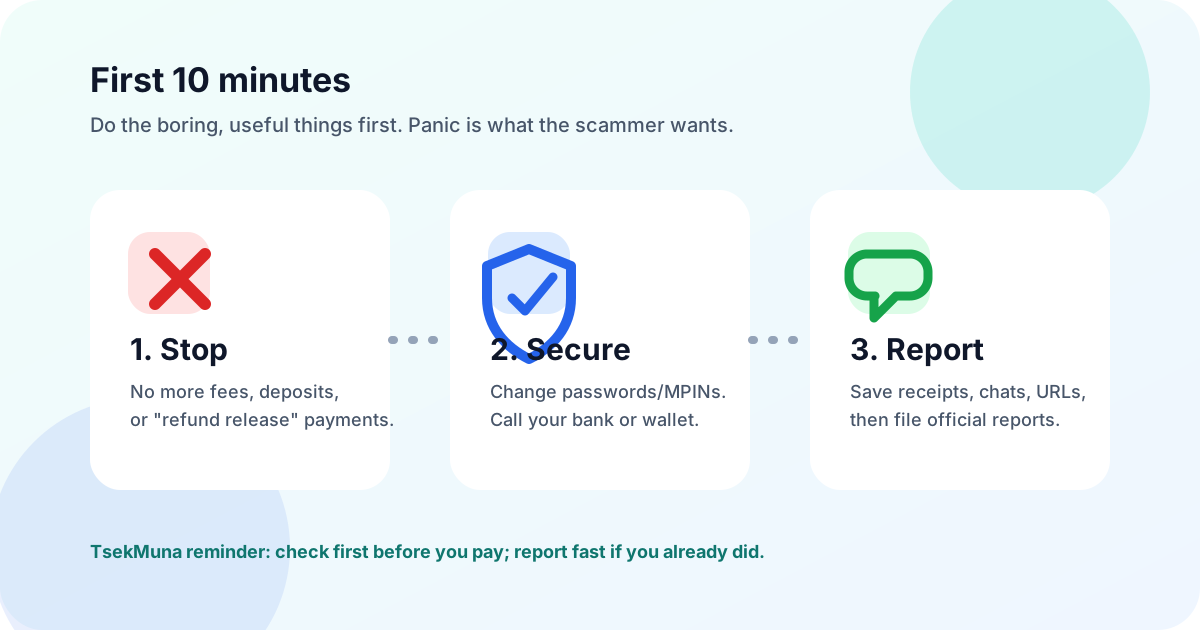
- 1Stop all payments immediately. Recovery-fee, tax-fee, verification-fee, and unlock-fee requests are usually the same scam continuing.
- 2If a bank, card, or e-wallet is involved, contact that provider through the official app or hotline and ask about freezing, blocking, or disputing the transaction.
- 3Change the affected MPIN, password, and email password from a trusted device if you shared any credential or clicked a suspicious link.
- 4Preserve evidence before blocking the scammer: profile, number, URL, chats, receipts, and reference IDs.
- 5Report the incident to the platform where it happened, then to the right official agency based on the type of scam.
The practical order is: stop, secure, save evidence, report. Speed matters most for financial accounts.
Evidence to save before you report
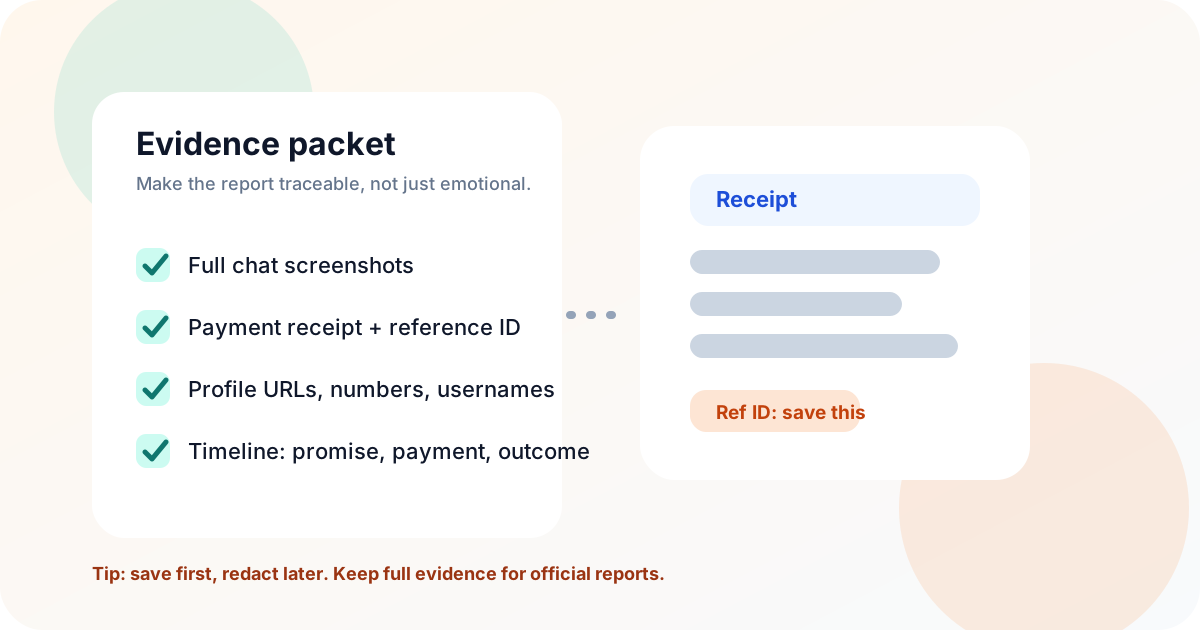
A useful report is not just "na-scam ako." Investigators, platforms, banks, and e-wallets need identifiers they can trace. Save the whole story in a simple timeline: when the offer started, what was promised, what account or number received payment, and what happened after.
- Do not delete the chat yet, even if you feel embarrassed or angry
- Do not edit screenshots except to redact sensitive data for public posts
- Do not send your only copy of evidence to the scammer or an unofficial "recovery agent"
- Screenshots of the listing, profile, messages, comments, and payment instructions
- The scammer identifiers: phone number, username, profile URL, email, website, group, page, or marketplace listing
- Payment proof: bank/e-wallet receipt, reference number, recipient name, account number or masked number, amount, date, and time
- Delivery details if it was an online seller scam: tracking number, courier, promised shipping date, and proof that the item was not delivered or was different
- A short timeline in your own words, written calmly and factually
Report to your bank or e-wallet first if money moved
If the scam used GCash, Maya, a bank transfer, card payment, or another BSP-supervised financial service, report to that provider first through its official channel. Ask for the report or ticket number. If the issue is not handled properly, BSP consumer assistance can be used as an escalation route after you have first raised the concern with the financial institution.
For GCash scam transactions, GCash says to report the scammer to authorities, prepare details and screenshots, and report to GCash immediately. For unauthorized GCash transactions, GCash separately instructs users to report within 15 days through the Help flow. Maya directs users to its in-app Help Center, support ticket/chat flow, and hotlines, especially for suspected unauthorized transactions.
- GCash Help Center: Report a scamUse this when someone tricked you into sending money through GCash.
- GCash Help Center: Unauthorized transactionsUse this when you see GCash transactions you did not make.
- Maya: Contact and Help Center channelsMaya lists its in-app Help Center, ticket/chat flow, and hotlines for urgent account concerns.
- BSP Consumer Assistance MechanismUse BSP escalation after filing first with the bank, e-wallet, or supervised financial institution.
Keep the ticket number from your bank or e-wallet. You may need it when escalating to BSP or filing an official complaint.
Report cybercrime to PNP ACG, NBI, or CICC
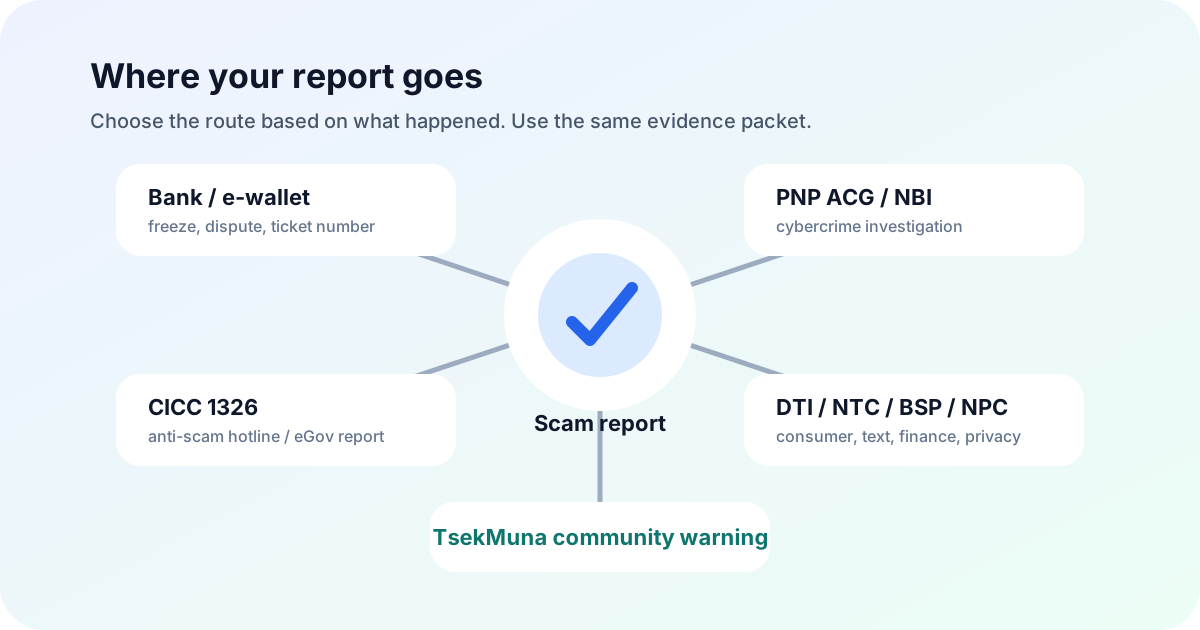
For online scam incidents that involve deception, identity theft, phishing, account takeover, threats, extortion, or larger losses, report to cybercrime authorities. PNP Anti-Cybercrime Group and the NBI Cybercrime Division handle cybercrime complaints and investigations. The CICC/1326 anti-scam hotline and eGov reporting channels are useful central reporting routes for scam links, suspicious messages, and cyber incidents.
- Bring or attach your evidence packet: screenshots, URLs, usernames, payment references, and timeline
- Use official websites, office numbers, or app channels only; do not trust random "agent" accounts in comments
- If threats, sextortion, or safety risks are involved, treat it as urgent and seek law-enforcement help immediately
- PNP Anti-Cybercrime Group contact pageUse for cybercrime complaints and regional anti-cybercrime unit contact details.
- NBI Cybercrime Division complaint assistanceNBI citizen charter page for investigative assistance to victims of computer crimes.
- PIA: Hotline 1326 anti-scam reporting initiativeGovernment information on Hotline 1326 and eGov scam reporting.
- PNA: CICC 1326 reporting guidancePublic report on CICC guidance for reporting suspicious online content and scams via 1326.
Use DTI, NTC, SEC, BSP, or NPC depending on the scam type
Not every scam report goes to the same place. A fake online seller may involve DTI, a text scam may involve NTC, a bank or e-wallet issue may involve BSP, an investment or lending scam may involve SEC, and misuse of personal data may involve the National Privacy Commission. If several apply, file with each relevant channel and reuse the same evidence packet.
- 1Online seller or consumer transaction: use DTI CAReS or DTI/Fair Trade channels, especially when a business or merchant is involved.
- 2Text scam or spam number: report through NTC text scam/spam reporting and preserve the SMS screenshot showing the number.
- 3Bank, card, or e-wallet issue: report first to the institution, then escalate to BSP if unresolved.
- 4Investment, lending, or online lending app issue: check SEC-related reporting guidance and official advisories.
- 5Personal data misuse, doxxing, leaked IDs, or privacy violation: file with the National Privacy Commission when the issue is about misuse of your personal information.
- DTI complaints pageConsumer complaint filing guidance and CAReS link.
- DTI eCommerce FAQ: online seller complaintsDTI guidance for complaints against online sellers.
- NTC text scam/spam report formUse for text scam, spam, and scam-number reports.
- BSP verifier and where-to-report guidanceBSP page with reporting guidance for financial scams and supervised institutions.
- National Privacy Commission: File a complaintUse when your personal data was misused, maliciously disclosed, or breached.
What not to upload or post publicly
It is understandable to want to warn people immediately. But posting raw personal data can hurt your own case, expose innocent third parties, or create privacy/legal problems. Public warnings should be factual, masked, and focused on verifiable behavior.
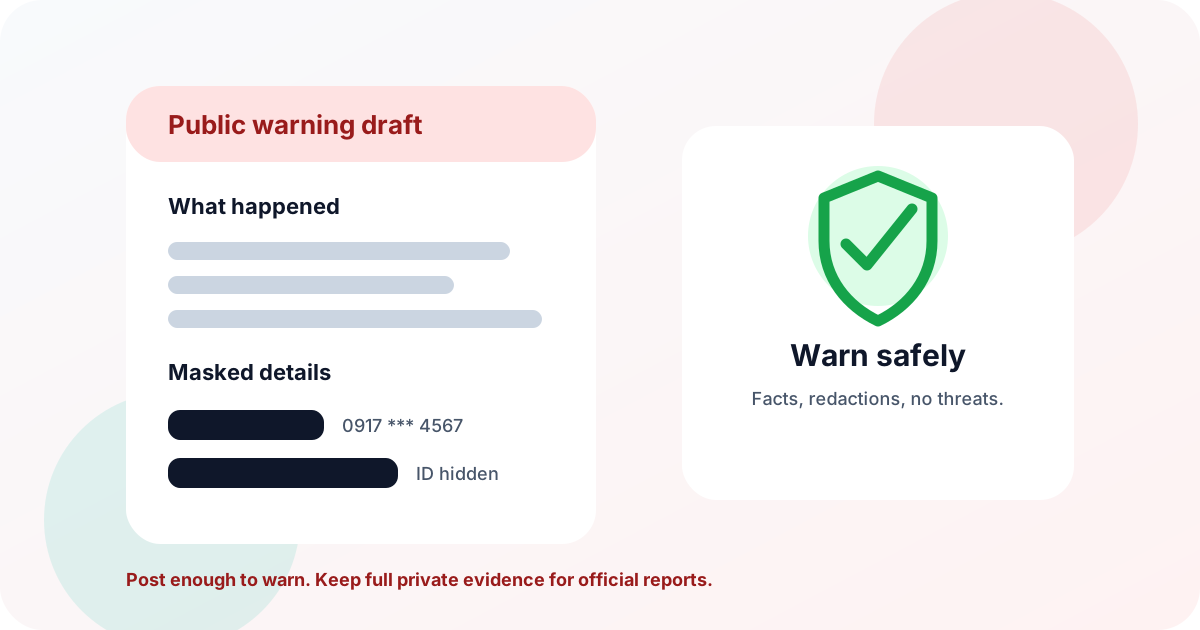
- Never post OTPs, MPINs, passwords, full card numbers, full IDs, full addresses, or private family details
- Avoid threats, revenge language, or calls for harassment
- Do not post explicit images, child-related material, or leaked private files even to "prove" the scam
- Do not accuse a business or person beyond what your evidence can support
- Mask phone/account numbers except enough digits for people to recognize a pattern
- Write what happened in neutral language: date, platform, promise, payment method, and outcome
- Keep unredacted evidence for banks, platforms, police, or regulators
- Use TsekMuna community reporting when you want a searchable warning with masking built in
How TsekMuna fits before and after payment
Before payment, TsekMuna is a quick verification layer: check a phone number, seller name, link, payment detail, or screenshot before you send money. After a scam, TsekMuna is a community warning layer: submit a factual report so the next person can find the warning before paying.
TsekMuna is not a police station, court, bank, or refund service. It does not decide guilt and it cannot force recovery. Its role is to help Filipinos pause before payment, understand risk signals, and share masked community reports responsibly.
If you already lost money, do both tracks: official reporting for investigation or possible account action, and a TsekMuna report to help protect the next buyer. You can start from Run a Scam Check, browse community reports, or read the shorter TsekMuna report guide.
- Before paying: paste the link, number, or seller detail into TsekMuna
- After paying: save evidence, report to official channels, then submit a masked community report
- For urgent financial loss: contact the bank or e-wallet before creating any public post
Simple report template you can copy
Use this structure when emailing a platform, filing with a provider, or preparing a complaint. Keep it factual and attach evidence separately.
Subject: Scam report - [platform/payment method] - [date]
I am reporting a suspected online scam. On [date/time], I contacted [seller/profile/name/number] through [platform]. They offered [item/service/job/investment]. They instructed me to pay [amount] to [bank/e-wallet/account name/number] with reference number [reference]. After payment, [what happened: no delivery, blocked me, asked for more fees, unauthorized transaction, etc.].
Attached are screenshots of the listing/profile, full conversation, payment receipt, recipient details, URLs/usernames, and my timeline. I am requesting investigation, account review or freezing where possible, and guidance on next steps.
Do not exaggerate. A calm, complete, evidence-backed report is easier to process than an angry one.
Quick decision guide: where should I report first?
If you are unsure, choose the route based on what happened most recently. The goal is to avoid losing time while still preserving the right evidence.
- Money left your account: bank or e-wallet first, then BSP escalation if unresolved
- Fake seller or no delivery: platform and DTI; if fake identity or deliberate fraud, also PNP ACG or NBI
- Phishing link or suspicious SMS: CICC/1326 and NTC; secure any account you entered into the fake page
- Investment, lending, or loan-app scam: SEC-related route, BSP if a supervised financial institution is involved, and cybercrime authorities when fraud or harassment appears
- Threats, blackmail, sextortion, or identity theft: law enforcement immediately; do not negotiate with the scammer
Frequently asked questions
Where do I report a scammer in the Philippines?
Report money-related scams first to the bank or e-wallet involved. For cybercrime, report to PNP Anti-Cybercrime Group, NBI Cybercrime Division, or CICC/1326. Depending on the case, DTI may help with online seller complaints, NTC with text scams, BSP with unresolved financial-institution complaints, SEC with investment or lending issues, and NPC with personal data misuse.
Should I report to GCash or Maya before going to the police?
If the payment or unauthorized transaction happened through GCash, Maya, or a bank, report to the provider immediately because account action is time-sensitive. You can still file with PNP ACG, NBI, CICC, or other agencies after preserving your evidence.
Is a TsekMuna report an official police report?
No. A TsekMuna report is a masked community warning and risk signal. It can help warn other people, but it does not replace a police report, bank/e-wallet complaint, regulator complaint, or court/legal process.
What evidence should I include when reporting a scam?
Save the profile or listing URL, username, phone number, email, payment receipt, reference number, recipient name, amount, date/time, full chat screenshots, delivery details, and a short timeline of what happened.
Can I post the scammer publicly?
You can warn others, but keep it factual and mask sensitive personal data. Do not post OTPs, IDs, passwords, full addresses, full account numbers, explicit material, private third-party information, threats, or anything you cannot support with evidence.
Can I get my money back after reporting?
Recovery is not guaranteed. Fast reporting to the bank or e-wallet gives the best chance of account review, freezing, or dispute handling, but funds may be difficult to recover once withdrawn or moved. Keep your official ticket numbers and evidence.